
Cross-Image Try-On LoRA
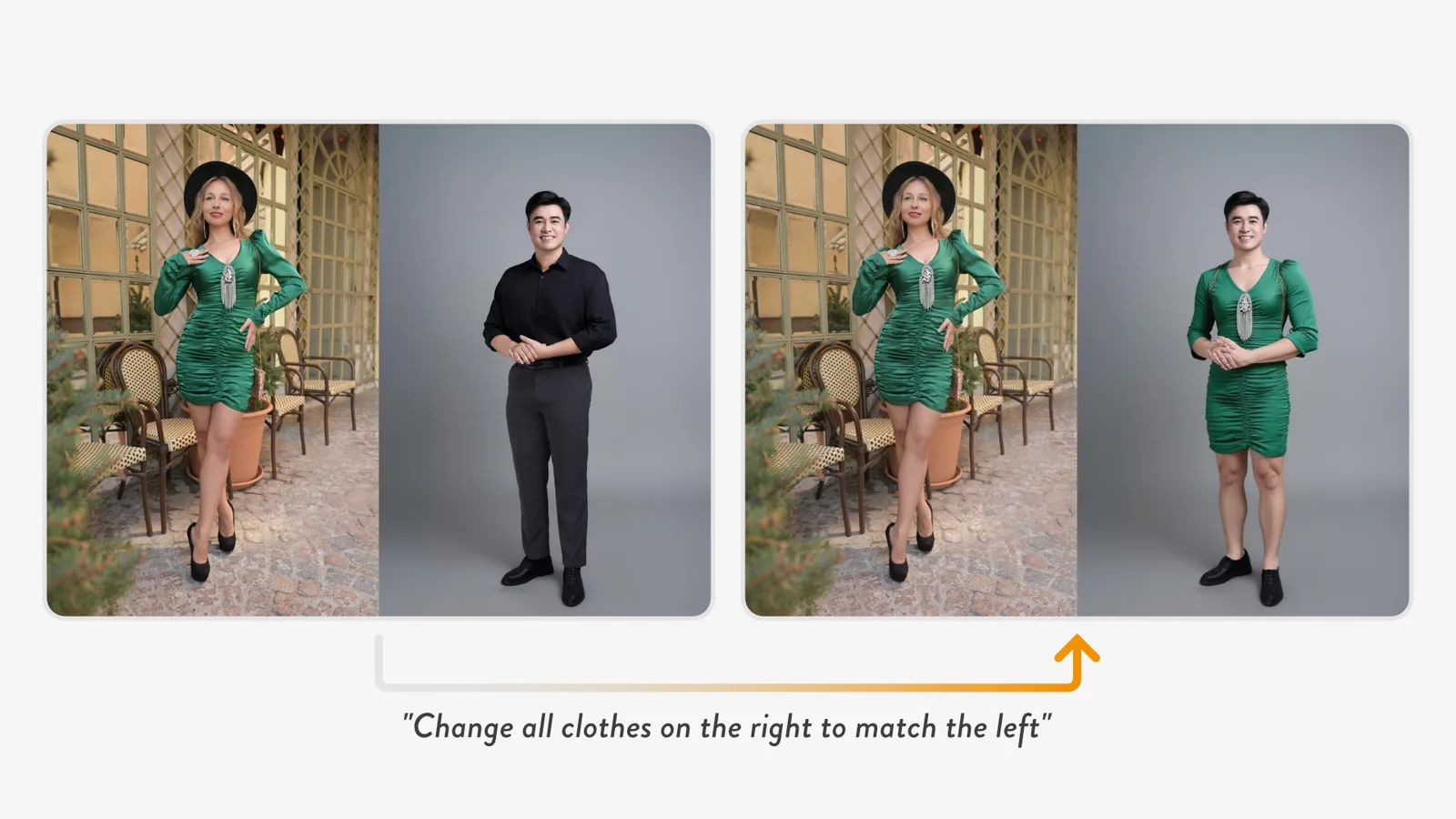
We released a LoRA for the image editing model FLUX.1 Kontext that dresses the person in one image in the clothes from another. Kontext accepts only one image, so the image of the clothes to reference and the image of the person to dress are placed side by side and given to it as a single image.
The instruction is a single sentence: "Change all clothes on the right to match the left." With this LoRA, Kontext looks at the clothes on the left and redraws only the clothes of the person on the right.
Only one image in
Kontext is an image editing model that redraws the image it is given according to an instruction. Like most image editing models at the time, it accepted only one input image. To dress a person in the clothes from another photo, the model has to see a second image, and there was no way to show it one.
Side by side, as one image
Our starting point was ACE++, an image generation technique. ACE++ places a reference image and a blank area side by side as one image, then fills the blank side by inpainting. Because both are in the same image, the model can look at the reference on the left while drawing the right.
The same should hold for an image editing model. Put the clothes to reference on the left and the person to edit on the right, and to Kontext it is just one image. If the model treats the left half as a reference and edits only the right half, even a model that takes one image can edit with a reference image.
A LoRA that treats the left half as a reference
Before training, Kontext simply edited the side-by-side image as a single picture and could not use the left half as a reference. So we trained a LoRA on pairs: the input image with clothes and person side by side, and an output image where the person on the right is wearing the clothes from the left.
With the LoRA, the left half stays as it is, and the person on the right keeps their face and pose while only the clothes change to those on the left. The output is also a side-by-side image, so you crop the right half to use it.
Now that more image editing models accept several images directly, there is no longer any need to place images side by side. At the time, though, it was a meaningful way to let an editing model that takes only one image use a reference image. The accuracy is not good enough for practical use, so it is published for research and experiments.